On a multi-page form, you can route respondents past pages that don't apply to them.
Add a navigation rule
- In the editor, select a page.
- Open its Page navigation panel.
- Add a rule: Go to [page] when [conditions].
- Conditions use the same field → operator → value rows as field logic, combined with ALL / ANY.
- Save.
How it evaluates
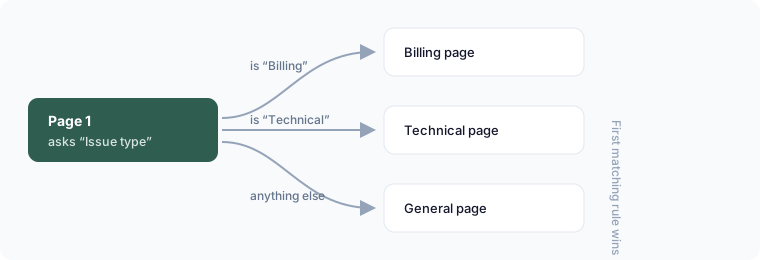
When a respondent clicks Next, Flowora checks that page's navigation rules in order and jumps to the first one whose conditions are true. If none match, it goes to the next page as normal.
Example
A support form's first page asks Issue type. Add rules on page 1: go to the Billing page when Issue type is Billing; go to the Technical page when Issue type is Technical. Everyone else falls through to a general page.
Keeping it sane
Rules are listed and reorderable so you can see the whole branching structure. Deleting a page automatically removes rules that pointed at it.