A workflow runs automatically whenever a form is submitted — no manual step.
Follow these steps to set one up:
Build one
- Open the form and go to its Workflow tab.
- The trigger is the form submission. Add action steps after it.
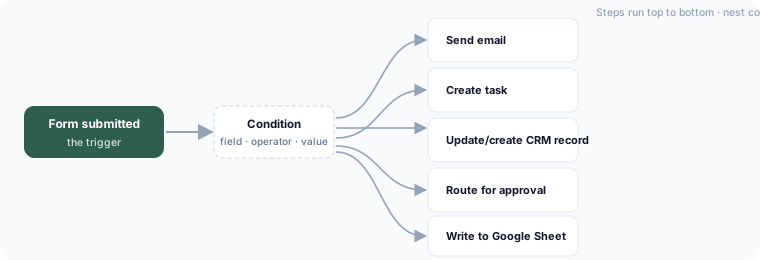
- Action steps include: send an email, create a task, update or create a CRM record, route for approval, write to a connected Google Sheet, and conditional branches.
- Use a condition step to branch — for example, only notify the finance team when amount > 1000.
- Save. The workflow runs on the next submission.
Order and branching
Steps run top to bottom. A condition step splits the flow into branches that run based on the submitted answers. Conditions use the same field → operator → value rows and ALL / ANY matching as form logic — see Condition operators. Nest conditions to build multi-way routing (region → team, amount → approval level, and so on).
Templates
Start from a workflow template instead of a blank canvas — pick one that matches your process and adjust it.
Testing
Submit a test response to your own form and watch the workflow run. Every run is logged so you can see which steps fired.