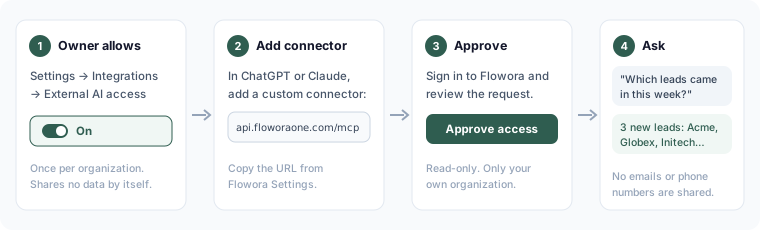
You can connect ChatGPT or Claude to Flowora and ask them about your CRM leads, for example "Which leads came in this week?" or "Find the lead from Acme Corp".
What a connected app can do
Read (always asked for)
| Area | What the app can look up |
|---|---|
| Leads, contacts, companies | Lists, search and details: name, company, status, source, owner and dates |
| Deals and pipeline | Deals with stage, value, probability and closing date; deals and value per pipeline stage |
| Tasks and activity | Your open tasks (overdue, due today, this week) and the recent activity of a lead, contact or deal |
| Forms and responses | Your forms and their questions, responses, a summary per question, and views, starts, submissions and conversion |
Make changes (only if the app asks and you approve)
| Area | What the app can do |
|---|---|
| CRM | Create or update a lead, add a note, create a task for you, move a deal to another stage |
| Forms | Create a new form with AI from a description, or change a form's questions with AI. Forms stay drafts — publishing is always done in Flowora. These use your AI credits, like the AI Form Builder. |
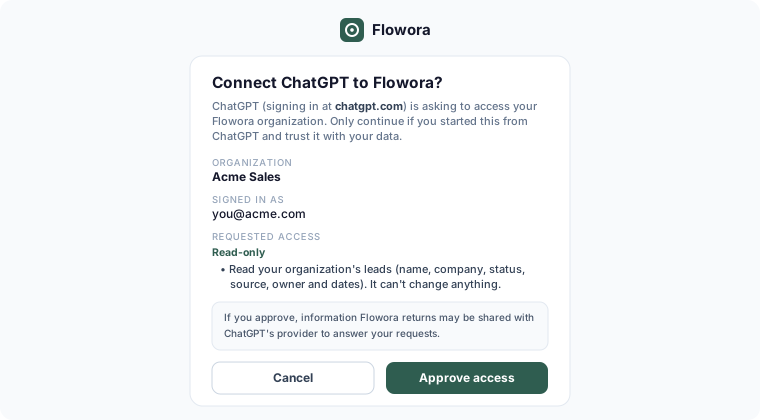
The consent page says when an app is asking to make changes, and ChatGPT and Claude ask you before each change.
- Email addresses, phone numbers and addresses are never shared. In form responses, answers to email, phone, address, upload and signature questions are returned as "hidden".
- The app sees only what you can see and do in Flowora. If your role can't view deals, neither can the app; if it can't edit leads, the app can't either.
- It only ever sees your own organization.
1. The owner allows connections (once)
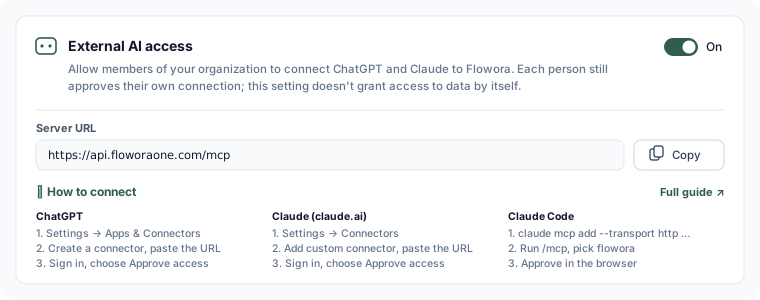
The organization owner goes to Settings → Integrations → External AI access and turns on Allow ChatGPT and Claude connections. This doesn't share any data by itself. Each member still approves their own connection.
2. Connect your app
All apps use the same server URL, which you can copy from Settings → Integrations → External AI access:
https://api.floworaone.com/mcp
When you connect, Flowora shows what the app is asking for. Check that you started the request yourself, then choose Approve access:
ChatGPT
- Open Settings → Apps & Connectors. On some plans you first turn on Developer mode under Advanced. Custom connectors depend on your ChatGPT plan and, on business plans, on your workspace admin.
- Create a connector and paste the server URL.
- Sign in to Flowora when asked and choose Approve access.
Claude (claude.ai)
- Open Settings → Connectors → Add custom connector.
- Paste the server URL.
- Sign in to Flowora when asked and choose Approve access.
Claude Code
- Run
claude mcp add --transport http flowora https://api.floworaone.com/mcp. - Run
/mcpand choose flowora. - Approve access in the browser window that opens.
See and disconnect connections
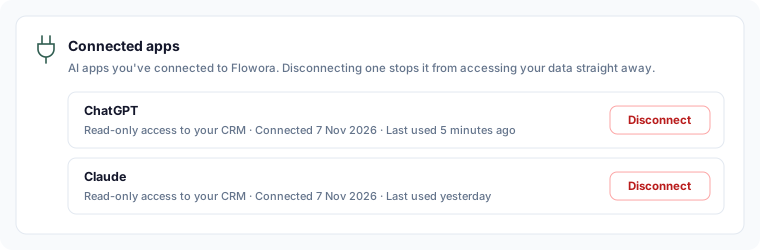
Settings → Integrations → Connected apps lists your connections, with the app, its access, and when it was connected and last used. Choose Disconnect to stop an app straight away. The owner also sees everyone's connections in the organization and can disconnect any of them. Turning External AI access off stops every connection at once.
Privacy
When you ask ChatGPT or Claude a question, the information Flowora returns to it — CRM details and form responses, without contact details — is processed by OpenAI or Anthropic under their terms. Flowora keeps a record of each connection and each tool use, without your questions or the data returned. See our Privacy Policy.
Troubleshooting
- "Ask your organization owner": External AI access is off for your organization.
- "This request has expired": start connecting again from ChatGPT or Claude, and finish in the same browser.
- The app stopped working: it may have been disconnected, or access was turned off. Connect again.