Flowora reads an existing form document and rebuilds it as an editable online form — you don't retype it.
Follow these steps to import one:
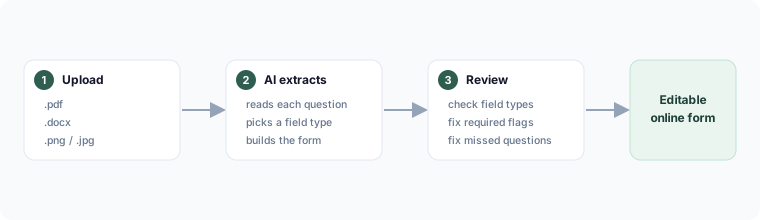
Supported files
- PDF (
.pdf) - Word (
.docx) - Image — a photo or scan (
.png,.jpg,.webp)
Maximum file size applies; a clearer scan produces a better result.
Steps
- Go to Forms → New form → Import, or use /create without signing in.
- Upload the file.
- AI extracts the questions, picks a field type for each, and builds the form.
- Review — check field types and required flags, and fix anything the scan missed. Questions the AI couldn't confidently type come in as short-text fields you can change.
What doesn't carry over
Signature lines and complex layout become the closest online equivalent. Multi-part "Day / Month / Year" style date questions are combined into a single date field where Flowora is confident, or laid out together otherwise.